TwistedMexi
patreon
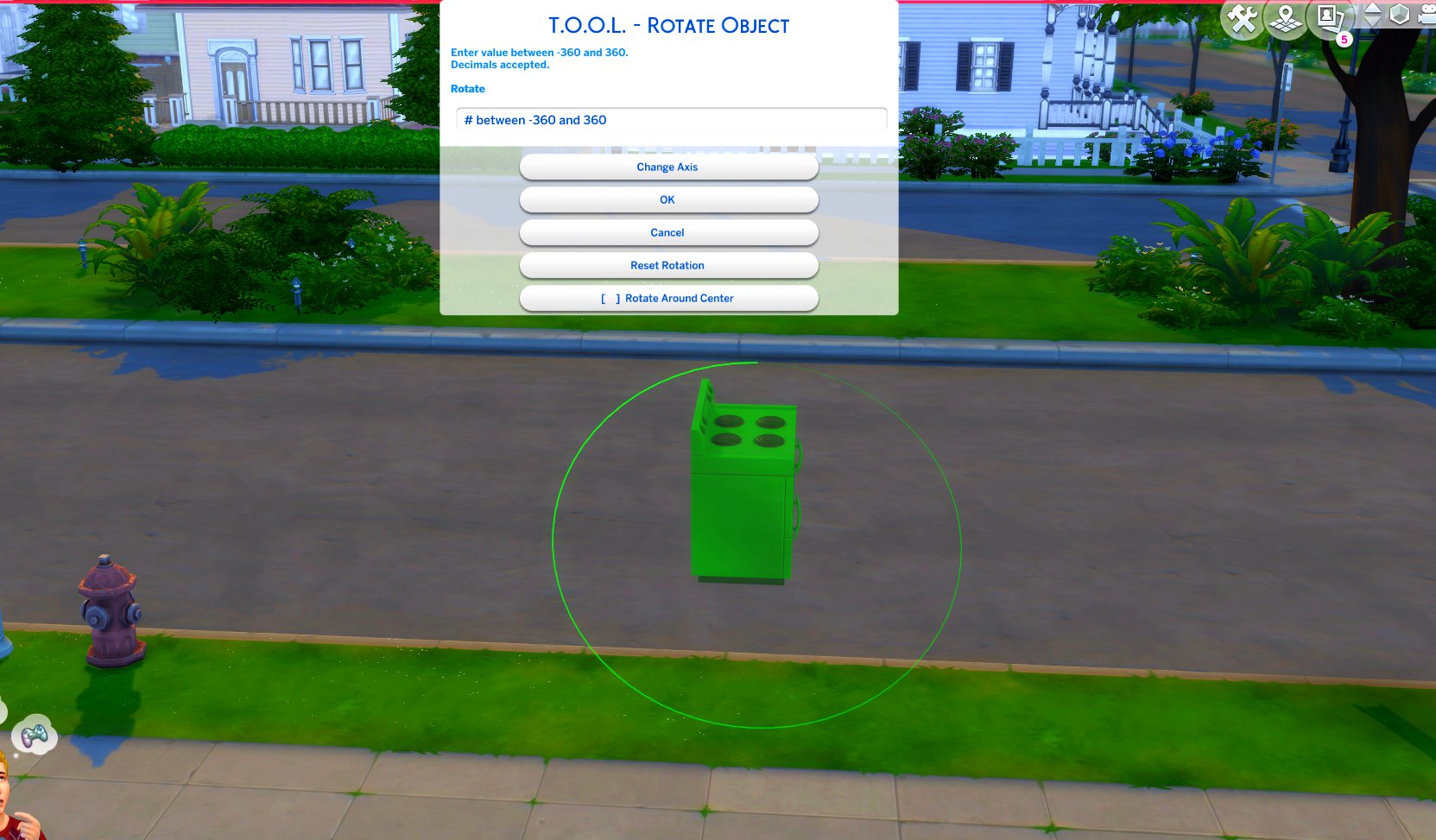
TOOL v2.3 brings a new feature called Rotate Around Center. It's a toggle in the rotate dialog that lets you choose whether group rotation will rotate all objects around their own axis, or around the group's center.
This video demonstrates the difference.
Many players requested this, as it'll allow them to rotate TOOL-only builds after they've finished, instead of having to plan which rotation they want to begin with. I hope everyone enjoys.
TOOL Build Mode Quick-Start

thank you for always being on top of your mods! i take pleasure in knowing that when there is an update i can count on you! thanks!!<3
Menu still crashed :C
yeah i have been having the same issue i temporly put the old BBB in and it worked so it might be that
The Menu still crashed babeee
Hi TwistedMexi! I love your work, you're amazing! I noticed that since the update/new pack, I can't bring TOOL up with shift-T, whether I'm in build mode or live mode. I don't have BBB enabled so that probably explains the build mode issue, but I thought I'd let you know that tool *might* be broken (it could be user error 🤷♀️). Anyway, thanks for all you do! Rock on! 🤘🫶
Thanks for the update, it was still working yesterday with the last patch, at least for me.. but I'll remove the old one and drag the new one in the mods folder, and I knew BBB wouldn't work with the newest patch because of FreeCam, I'm a noob at Modding myself but I knew, that the FreeCam is already with BBB and EA added it in the game could cause issues, so I moved it away from my mods folder. I'll look soon for the update, but don't feel in rush to do that, have your free time as well. Happy Simming
Oh thank goodness, you are amazing to have this out so quickly. As for BBB, I noticed that glitchiness last night, so will look forward to the update. Just don't feel obligated to rush, you need to take some "you" time as well ;)
Hello, I've noticed this seems broken since the newest patch and pack! Can't wait for it to be fixed, I use this TOOL religiously and decorating is not fun anymore without the freedom. Since the update and pack release, I noticed the issue where it causes white screen/crashes when opening the werewolf world again!
Well whatever. That one 😂
Finally taking the TOOL plunge! Thank you for your amazing mods. I can't wait to make my neighborhoods more lively and varied!
Uh... TwistedMexi? "Appaloosa Plains" was the TS3 Horse World. I haven't played it myself yet but everything I've seen says the TS4 Horse World is "Chestnut Ridge" .
U Welcome. Maybe he just waited for the Horse Ranch Pack and than he will update the mods. I cant and wont build without the tool mod....lol
Thank you! I keep debating on when to open sims, since mods are breaking again tomorrow lol ;-) <3
I have the same problem, I just found out after updating the game today.
Its the better build mod who cause this. I removed it from the Folder and it looks how suppose to look :) I think he will updatet his mod pretty soon as always ♥
TOOL is my favorite mod! My builds have improved because of it, and I'm so grateful that you created it, and better build buy! Do you know if today's update broke either of them, or if the horse pack will? The update made build mode look strange, so I've been checking to see which mods might be broken.
how do i download this?
no
will this have a negative effect on gameplay if i don't have the GT pack?
One of the best Mods out there, its one of my favorites, I love it, I need it and can't play the Sims without Tools!
funny joke
Update your game
Is it possible to find an older version somewhere? I have the game version 1.90 and because of this (maybe) there are visual bugs. Or the new version of the mod should be compatible with the old version of the game?
i have tool and better buildbuy and tool will not pop up
TOOL was updated for that back when the patch dropped. Update via TwistedMexi.com
I get a white screen for san sequoia and tested out all mods and it only happens with tool. I have chosen tool over being able to use new world
Then you might have a conflict in. Come to discord.twistedmexi.com so we can troubleshoot
As I said, you have to have better buildbuy installed
I can use the shift click option but I can’t open the menu by using shift+t in build mode is this just a Mac feature?
You have to have Better BuildBuy installed, refer to the Quick Start sections in the post.
The new update fixed the issue with the high school pack world fading to white and crashing my game, but now the same thing happens to san sequoia. I don't mind waiting for the next pack update to TOOL for the fix, I just haven't seen anyone talking about it? Am I doing something wrong?
Gracias eres genial
Thanks so much for all the work you do!
You are amazing! All this and CAW, too -- tell me, do you ever sleep?
☺️💕☺️
It was already updated, you should have received an email notification
can you let us know when this is updated
yeah just learned this so sad
thanks dude ♥
Yes, this is something TOOL has to be updated for every time a world is added. Coming shortly.
new world map does not appear with growing together when tool mod is in mods folder :(
🤗🔆🤗
Thanks so much, I missed that update.
You need the BBB update from today
Hi there, thanks for all of your work! I'm having a small issue even with the updated TOOL where if I click on something that's sorted by room in Build/Buy it shows the entire DEBUG and Liveedit menu rather than just the items in that category. Super sorry if this has already been answered! Thank you :)
Thank you thank you thank you for such quick updates, you're a magician !!
That was really quick. The infants update broke all my mods. Thanks a lot
Thank you for quickly updating!
Thank you for updating so quickly! I never open my game after an EA update until I have all your mods updated as well. 💜
I can do without cc such as furniture, but I can't do without your mods. Thank you for updating so quickly!
Thank you so much!
You are amazing!! Thank you for all your hard work 🥰
You´re the best and so fast. Thank you so much